

Quick answer: The best hashtags for Instagram Reels are 5 specific tags that describe the video: 2 niche tags, 2 topic tags and 1 branded or community tag. Five is the most Instagram allows (Help Center, since December 2025). Copy a pack for your niche below, then let IShort, a free Chrome extension, rank your tags by the views they got.
Copy-Paste 5-Tag Hashtag Packs by Niche
Each pack is exactly 5 tags, the most Instagram allows on a Reel. Swap the last tag for your own branded or series hashtag once you have one, and change the niche tags to match what the Reel actually shows.
| Niche | 5-tag pack | |
|---|---|---|
| Fitness | #homeworkouts #strengthtraining #coreworkout #fitover40 #fitfam | |
| Food & recipes | #quickrecipes #easydinner #mealprep #plantbasedmeals #foodreels | |
| Fashion | #outfitinspo #minimaliststyle #curvyfashion #fallfashion #ootd | |
| Beauty | #skincareroutine #dryskincare #naturalmakeup #makeuptutorial #beautytips | |
| Travel | #solotravel #budgettravel #hiddengems #beachlife #travelreels | |
| Business | #smallbusinesstips #sidehustle #freelancelife #contentcreator #creatoreconomy | |
| Education | #sciencefacts #historylesson #quicktips #studytips #learnsomethingnew | |
| Entertainment | #comedyskits #storytimereels #relatable #behindthescenes #comedyreels |
These tags are starting points taken from the niche table further down, not a guarantee of views. Hashtags tell Instagram what the Reel is about; the Reel itself earns the reach. Put them at the end of a real caption (see these caption ideas for Reels) and tick them off in the Reels checklist before posting.
Check which of these tags worked for you
- Open instagram.com/yourname/reels/ (or a competitor's) in Chrome.
- Open IShort in the side panel and let it collect the Reels.
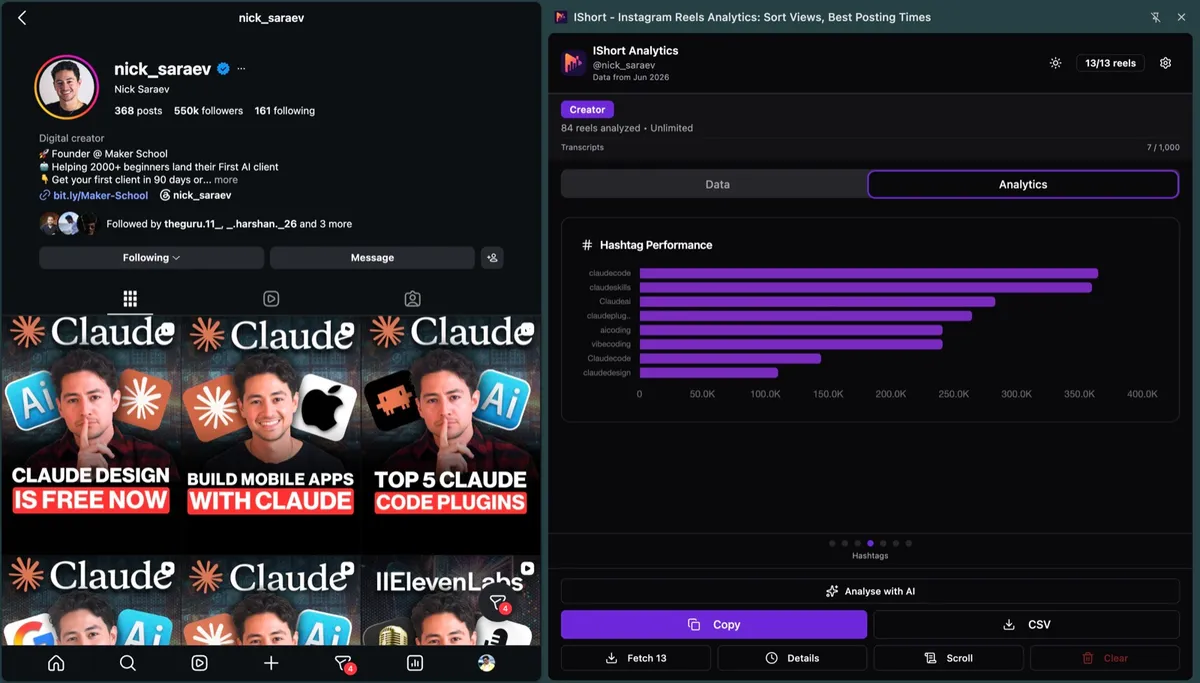
- Swipe to the Hashtags slide: every tag is ranked by the average views of the Reels that used it.
How Instagram's Hashtag System Works in 2026
Instagram's approach to hashtags has evolved significantly. While hashtags are still relevant, they work differently than they did in previous years. Here's what changed:
The algorithm now treats hashtags as context signals rather than primary discovery tools. When you add hashtags to your Reel, Instagram uses them to understand what your content is about, not just to place it in hashtag feeds.
This means Instagram is looking at:
- Relevance: How closely do your hashtags match your actual content?
- Authenticity: Are you using tags that genuinely describe your Reel, or just popular tags?
- User intent: Do viewers who engage with these hashtags also engage with content like yours?
- Content quality: High-quality Reels with relevant hashtags get more distribution than low-quality Reels with dozens of tags
The hashtag feed itself is less important now. Most Reels discovery happens through the Reels tab, Explore page, and following feed. Hashtags help Instagram categorize your content so it can show it to the right audience in these places.
The Ideal Number of Hashtags for Reels
Since December 2025 Instagram allows a maximum of 5 hashtags on a Reel or post, down from the old limit of 30 (Social Media Today). Instagram's Help Center still says so in October 2026: with more than 5 tags, the caption won't post. Instagram said that fewer, more targeted tags work better than many generic ones.
Use 3-5 hashtags, never more than 5.
Here's why fewer hashtags often perform better:
- Higher relevance signal: When you use 3-5 carefully chosen tags, each one carries more weight in telling Instagram what your content is about
- It is the rule now: Instagram no longer accepts more than 5 hashtags on a Reel or post
- Forces strategic thinking: Limited hashtags force you to choose only the most relevant tags for your specific content
- Better user experience: Captions aren't cluttered with hashtag spam, making them more readable
That said, the exact number matters less than the quality and relevance of the hashtags you choose. Five specific, relevant hashtags do more than five generic ones like #reels or #explore.
The 4 Categories of Hashtags You Need
Not all hashtags serve the same purpose. The most effective hashtag strategy uses a mix of these four categories:
1. Niche-Specific Hashtags
These describe your specific content area or industry. They're moderately sized (50K-500K posts) and highly targeted.
Examples: #plantbasedrecipes, #homeworkouttips, #minimalistfashion, #digitalnomadlife
These are your primary hashtags. They should make up 2-3 of your 5 hashtag slots.
2. Community Hashtags
These connect you with specific communities or movements on Instagram. They often have engaged, active audiences.
Examples: #bookstagram, #fitfam, #creatoreconomy, #sustainableliving
Use 1-2 community hashtags that genuinely apply to your content and values.
3. Trending Hashtags
Current trends or viral challenges. These change frequently and can provide temporary visibility boosts.
Examples: Whatever's currently trending in your niche or on the Reels tab
Use 0-1 trending hashtags, and only if they're genuinely relevant to your Reel. Don't force it.
4. Branded Hashtags
Your own unique hashtag that represents your brand or content series.
Examples: #YourNameCooks, #MondayMotivationWithYou, #60SecondScience
Use 0-1 branded hashtag. This helps build your content library but doesn't drive new discovery.
Top Performing Hashtag Categories by Niche
Hashtag categories that suit each major niche. Treat them as starting points and test them against your own data:
| Niche | High-Performing Hashtag Categories | Examples (50K-500K range) |
|---|---|---|
| Fitness | Workout type, fitness goal, training method | #homeworkouts, #strengthtraining, #fitover40, #coreworkout |
| Food & Recipes | Cuisine type, dietary restriction, meal type | #quickrecipes, #plantbasedmeals, #mealprep, #easydinner |
| Fashion | Style aesthetic, season, occasion, body type | #minimaliststyle, #fallfashion, #curvyfashion, #outfitinspo |
| Beauty | Product type, skin concern, makeup style, technique | #skincareroutine, #naturalmakeup, #dryskincare, #makeuptutorial |
| Travel | Destination type, travel style, budget level | #hiddengems, #solotravel, #budgettravel, #beachlife |
| Business | Business type, entrepreneur journey, specific skill | #smallbusinesstips, #sidehustle, #contentcreator, #freelancelife |
| Education | Subject matter, learning type, audience level | #sciencefacts, #learnontiktok, #historylesson, #quicktips |
| Entertainment | Content format, humor style, pop culture | #comedyskits, #storytimereels, #behindthescenes, #relatable |
How to Research Hashtags That Actually Work
Finding the right hashtags for your content requires research. Here's a step-by-step process:
Step 1: Search Related Hashtags in Instagram
Type a hashtag related to your content into Instagram's search bar. Look at:
- Post count: Aim for 50K-500K posts. Too small (under 10K) means limited reach. Too large (over 1M) means you'll get buried.
- Recent content: Is the hashtag actively used? Are recent posts getting engagement?
- Content quality: Do top posts match your content quality and style?
- Related hashtags: Instagram suggests related tags at the top. These are valuable alternatives.
Step 2: Read a Competitor's Hashtags Slide
Find 3-5 accounts in your niche with a similar audience size. Open each one's Reels in IShort's profile analyzer and read their Hashtags slide: it ranks the tags they used by the views those Reels got, so you do not have to read captions one by one. You're not copying their strategy, you're learning what works in your niche.
Step 3: Test and Track Performance
Try different hashtag combinations and track which ones drive the most views and engagement. Create a simple spreadsheet:
- Post date and topic
- Hashtags used
- Views reached in first 24 hours
- Engagement rate
After 10-20 posts, you'll start seeing patterns. Some hashtags consistently drive more views than others. Double down on those.
Tools like IShort's hashtag performance analysis can automate this tracking, showing you exactly which tags drive the most views for your specific content type without manual spreadsheet work. It's part of the free Instagram Reels dashboard, which works on any public account.
Step 4: Refresh Your Hashtags Regularly
Don't use the same 5 hashtags on every post. Rotate them based on:
- The specific content of each Reel
- Current trends in your niche
- Performance data from past posts
- Seasonal relevance (e.g., #summerfashion vs #winterstyle)
Common Hashtag Mistakes to Avoid
Even experienced creators make these hashtag mistakes that can hurt their reach:
1. Using Banned or Restricted Hashtags
Instagram has banned or restricted certain hashtags due to spam or inappropriate content. Using these can limit your post's visibility or even shadow-ban your account.
How to check: Search the hashtag on Instagram. If you see a warning message or if recent posts don't appear, it's restricted.
Common offenders: Many generic hashtags like #like4like, #followme, and surprisingly, some innocent-sounding tags have been restricted due to abuse.
2. Using Irrelevant Popular Hashtags
Adding #instagood or #love to a Reel about Excel tutorials doesn't help. Instagram's algorithm is smart enough to recognize when hashtags don't match your content, and it can actually hurt your distribution.
The fix: Every hashtag should accurately describe something in your Reel. If someone searched for that hashtag, would your content genuinely satisfy their search intent?
3. Only Using Massive Hashtags
Tags with 10M+ posts (#fitness, #fashion, #travel) are so saturated that your content gets buried within seconds. Unless you already have a massive following, these won't help you.
The fix: Focus on medium-sized hashtags (50K-500K) where you have a realistic chance of appearing in the top content.
4. Never Updating Your Hashtag Strategy
What worked six months ago might not work today. Hashtag popularity shifts, Instagram's algorithm evolves, and your content might be reaching a different audience now.
The fix: Review your hashtag performance monthly. Remove underperforming tags and test new ones.
5. Putting Hashtags in the First Comment
This used to be a popular tactic to keep captions clean, but it doesn't work anymore. Instagram treats caption hashtags and comment hashtags the same for categorization purposes, but caption hashtags tend to perform slightly better.
The fix: Put hashtags at the end of your caption after a few line breaks. This keeps them out of the way while ensuring they're counted from the moment you post.
Do Hashtags Still Matter in 2026?
Yes, but not in the way they used to. Hashtags are no longer the primary discovery mechanism they were in 2018-2020. However, they still serve important functions:
- Content categorization: They help Instagram understand your content topic and show it to interested users
- Search discovery: People do search hashtags, especially niche-specific ones
- Algorithm context: They provide additional signals about your content alongside audio, captions, and visual analysis
- Community building: Branded and community hashtags help create cohesive content collections
The key shift is that hashtags are now one signal among many. Your content quality, engagement rate, posting time, and how well viewers respond to your Reel matter more than which hashtags you use.
Think of hashtags as helpful context for Instagram, not a magic growth hack. Use them strategically to accurately describe your content, but don't expect them to do all the heavy lifting.
Track What Actually Works for Your Content
Every creator's audience is different. What works for someone else might not work for you. The key is testing hashtags and tracking which ones consistently drive views and engagement for your specific content.
Try IShort Free →Final Thoughts on Instagram Reels Hashtags
The Instagram hashtag landscape has matured. Instagram now caps you at 5 hashtags, so the days of pasting 30 trending tags are over. The modern approach is more thoughtful:
- Use 3-5 highly relevant hashtags per Reel
- Mix niche-specific and community hashtags
- Avoid banned, irrelevant, or oversaturated tags
- Research hashtags before using them (check size and recent posts)
- Track performance and optimize based on your data
- Refresh your strategy regularly as trends change
Most importantly, remember that hashtags support great content, they don't replace it. Focus on creating Reels that genuinely provide value, entertainment, or education. Then use hashtags strategically to help Instagram show your content to the right audience.
The creators who succeed with hashtags in 2026 aren't the ones using the most tags. They're the ones using the right tags for their specific content and audience.
Frequently Asked Questions
What are the best hashtags for Instagram Reels in 2026?
Five specific tags that describe the Reel: two niche tags, two topic tags and one branded or community tag. Five is the most Instagram allows. Copy a ready pack for your niche from the table above, then keep the tags that brought views and swap the rest.
How many hashtags should I use on Instagram Reels?
Three to five. Since December 2025 Instagram allows a maximum of 5 hashtags per Reel or post, and its Help Center says a caption with more than 5 won't post. Five precise tags beat five generic ones like #reels or #explore.
Do hashtags still work on Instagram Reels in 2026?
Yes, but their role has shifted. Instagram uses hashtags as one signal among many, alongside captions, on-screen text, audio and watch time, to classify your content and match it with viewers. They help Instagram understand what your Reel is about; they no longer act as a discovery feed by themselves.
Should I use trending or niche hashtags?
Mostly niche. With only 5 slots, broad tags like #reels put you among millions of posts, while very small tags limit who can find you. Use mid-sized niche and topic tags, and add a trending tag only when the Reel is really about that trend.
How do I find hashtags that actually work for my account?
Look at your own data. IShort, a free Chrome extension, collects your Reels and ranks every hashtag you used by the average views of the Reels that carried it. Open a competitor's public Reels page to see their best tags the same way.