

Quick answer: Top performing Reels beat the account's own average; they aren't just the most viewed. To find them on any public account with the free IShort extension:
- Open instagram.com/
username/ reels/ and let IShort load the Reels. - Click Views to rank them.
- Read the x avg badges: 2x or more is a breakout.
Then copy each breakout's hook, length, audio, format and CTA.
Just want the list by views? See how to sort Instagram Reels by views. Hunting breakouts across a whole niche? Use the Instagram viral Reels finder method.
Most Viewed vs Top Performing Reels: What's the Difference?
Most viewed is a raw count. Top performing is relative: how a Reel did against the same account's usual Reels. For example, 400,000 views can be an ordinary week for a 2-million-follower creator and a breakout for a 10,000-follower one. The breakout is the Reel worth studying.
| Signal | What it tells you | Watch out for |
|---|---|---|
| Most viewed (Views sort) | What reached the most people | Favours big accounts and old Reels |
| Top performing (x avg badge: views ÷ the account's average) | What beat this account's normal | One mega-hit lifts the average and hides smaller outliers |
| Viral Score (0-100: 35% like ratio, 35% comment ratio, 30% views vs average) | Whether people reacted, too | Low-view Reels can score well on ratios alone |
Use them in that order: Views to list, x avg to spot the breakouts, Viral Score to check people cared. A Reel high on all three is your strongest lead. The maths is in the Reels outlier score guide, and the plain ranking in how to see anyone's most viewed Reels.
How to Find the Top Performing Reels on Any Instagram Account
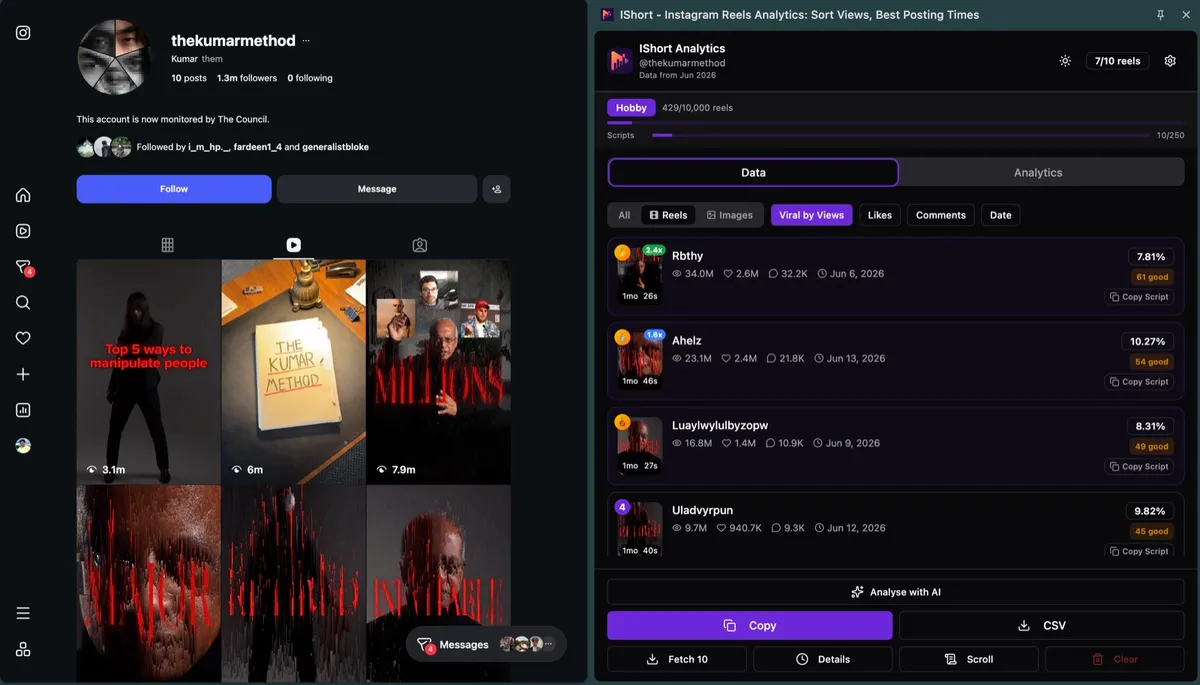
- Install IShort Add the free extension to Chrome or Edge from the Chrome Web Store listing. No Instagram password or business account needed.
-
Open the account's Reels tab on a computer
Go to instagram.com/
username/ reels/ for any public account: yours, a competitor's, or a private account you follow. - Load at least 30 Reels Scroll, or press IShort's Scroll button. The average, and so every badge, is based on the Reels you have loaded.
- Click Views and read the badges The list re-ranks, most viewed first, and the top 3 get rank badges. The x avg badge shows from 1.5x (blue), turns green from 2x, and red marks flops under 0.5x.
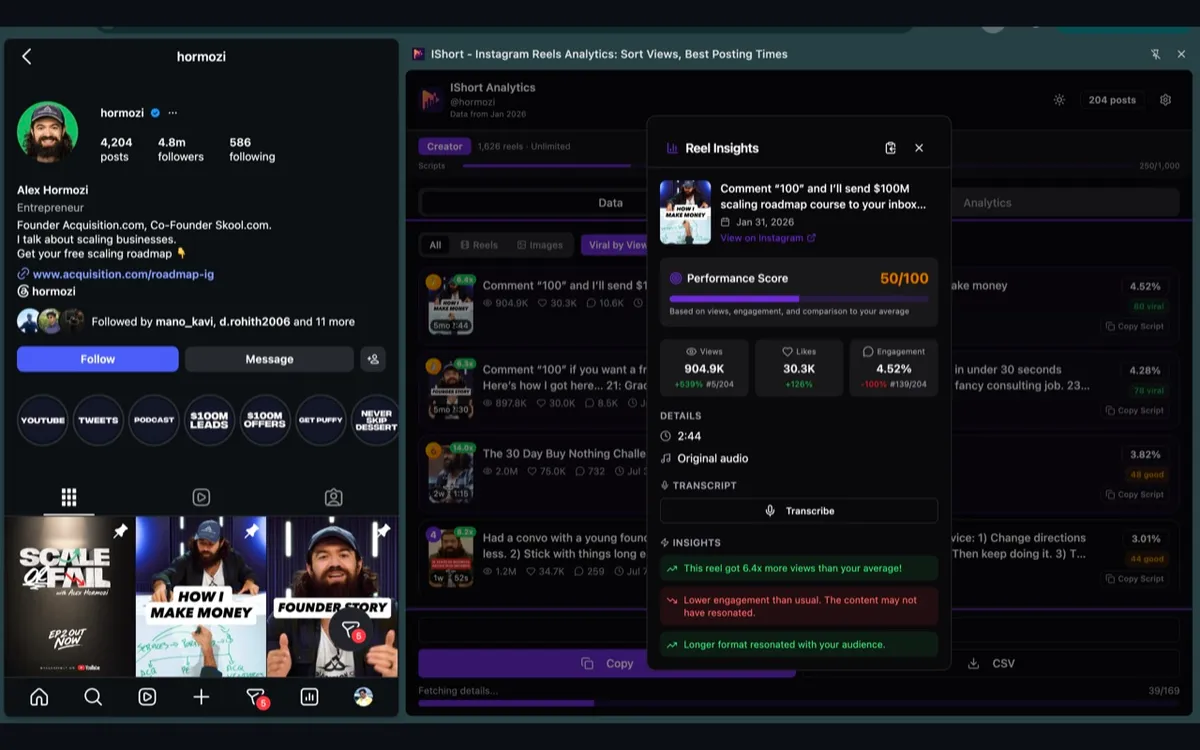
- Check with Viral Score Switch the sort to Viral Score. Reels that stay near the top had reach and reactions. Click any Reel for its insights, such as "This reel got 6.4x more views than your average".
- Export your shortlist Copy or download the CSV (views, likes, comments, duration, engagement, date, hashtags, music) to keep notes on each breakout.
Can Instagram Show an Account's Most Viewed Reels?
Partly. Since late 2025 the Instagram app has been rolling out a Most viewed / Latest switch on profile Reels tabs: tap or hold the Reels icon on a profile and pick Most viewed (PiunikaWeb, Nov 2025; still shown in a Sep 2026 walkthrough). Not every account has it, and instagram.com on a computer has no sort.
- The app shows view counts only: no multiple of the account's average, no likes per view, no export.
- Insights covers your own Reels only: views, watch time, viewers and follows per Reel, on public personal or professional accounts, for Reels up to two years old (Instagram Help Center).
How Big Is a Top Reel? What 355 Reels from 36 Accounts Show
We divided each Reel's views by the median views of the same account's Reels, for the 36 accounts with five or more Reels in IShort's sample (355 Reels transcribed by IShort users, Jul–Sep 2026).
| Views vs the account's median | Share of Reels | What it means |
|---|---|---|
| Under 0.5x | 17% | Flop for that account |
| 0.5x – 1.5x | 52% | Normal for that account |
| 1.5x – 2x | 8% | Above average |
| 2x – 5x | 14% | Breakout: study it |
| 5x or more | 9% | Rare hit |
Each account's single best Reel had a median of 4.7x its account's median views (middle half: 2.8x to 11.5x). So on a typical account about 1 Reel in 5 reaches 2x, and the best one lands near 5x. Use 2x as your "study this" bar.
Caveat: users chose which Reels to transcribe, so the sample skews toward successful Reels, and 36 accounts is a small base. IShort's badge divides by the average of the Reels you've loaded, which one mega-hit pulls up, so badges usually read a little lower than these median-based multiples.
Find Your Top Reels in Seconds
Stop guessing which content works. Install IShort and instantly sort your Reels by views, Viral Score, likes, comments or date, with outlier badges. Identify your top performers and replicate your success.
Install IShort FreeWhat to Copy from a Top Reel: a 5-Point Checklist
Copy the shape of a breakout, not its words. For each 2x+ Reel, note these five things, then compare them with the account's normal Reels. A pattern only counts if the outliers share it and the average Reels don't.
| Check | What to note | Where to see it |
|---|---|---|
| 1. Hook | Number or list, question, bold claim, "stop doing", story | Transcribe, then read the first sentence |
| 2. Length | Seconds, vs the account's usual length | Duration on each card and the Duration slide |
| 3. Audio | Original voice or licensed music, and which track | Insights view; Music column in the CSV |
| 4. Format | Talking head, voiceover with B-roll, text on screen, before and after | Watch the first frame |
| 5. CTA | Follow, comment, save, link in bio, or none | The last 5 seconds, or the end of the transcript |
What IShort's data shows for each check*
- Hook: number or list openers had a median 448,000 views (n=30) and questions 386,000 (n=82), vs 116,000 for "I…" story openers (n=79). More patterns: Instagram Reel hooks and how to write them.
- Length: Reels under 30 s had a median 353,000 views vs 202,000 for 30–59 s and 169,000 for 60–89 s. But within the same account length made no difference (36 accounts), and 2x+ outliers ran a median 57 s (n=70), the same as the rest (n=229).
- Audio: 1,026 Reels used original audio and 185 licensed music; within an account both ran at 1.0x the median (n=303 and 49). Need the track? Find the song used in an Instagram Reel.
- Format: not measured. Judge it by eye across the top 10.
- CTA: 31% had a spoken CTA. Comment prompts drew a median 8.6 comments per 1,000 views vs 0.55 with no CTA, and CTA Reels ran at 1.0x their account's median (n=43, vs 78 without): no reach cost.
*1,227 Reels transcribed by IShort users, Jul–Sep 2026 (hooks and CTAs: the 653 classifiable transcripts). Users chose which Reels to transcribe, so the sample skews toward successful Reels. These are correlations, not causes.
The lesson: no single length, sound or CTA makes a Reel break out across accounts. What repeats inside one account's outliers is the signal, so copy that account's pattern, not a generic rule.
Mistakes That Hide the Real Top Performers
- Comparing Reels across years. If an account has grown a lot, its old Reels reached a smaller audience. Compare Reels from the last 3 to 6 months.
- Loading too few Reels. Under 30 Reels, the average is shaky and one hit skews every badge.
- Letting one mega-hit set the bar. A single 20x Reel lifts the average and makes everything else look weak. Set it aside and read the badges of the rest.
- Ignoring the flops. The red under-0.5x badges at the bottom of the Views list show what to stop doing.
- Copying the topic, not the pattern. A creator's exact idea rarely travels; their hook type, length and format often do.
How to Turn Top Reels into Your Next Ideas
- Log every 2x+ Reel from 3 to 5 accounts in your niche (the CSV makes this quick).
- Fill in the 5-point checklist for each one and circle what repeats.
- Remake two with your own topic and voice, keeping the winning shape.
- Change one thing at a time, hook or length but not both, so you know what worked. See how to A/B test Instagram Reels.
- After 7 days, sort your own Reels by views and check the new ones' x avg badges.
For a weekly hunt across many accounts, use the viral Reels finder routine. For a full one-account audit with posting times and hashtags, see the Instagram profile analyzer guide.
Frequently Asked Questions
How do I see the most viewed Reels on any Instagram account?
In the Instagram app, some accounts can tap or hold the Reels icon on a profile and choose Most viewed. On a computer, install the free IShort extension, open instagram.com/username/reels/, let it load the Reels and click Views. IShort also shows each Reel's multiple of the account's average.
What counts as a top performing Reel?
A Reel that clearly beat the same account's usual views, not just a big number. A practical bar is 2x the account's average or more. In IShort's sample of 36 accounts, about 1 Reel in 5 reached 2x its account's median, and each account's best Reel was a median 4.7x.
What's the difference between the x avg badge and the Viral Score?
The x avg badge is a Reel's views divided by the account's average views, so it shows reach beyond normal. The Viral Score (0-100) mixes 35% like ratio, 35% comment ratio and 30% views vs the average, so it also shows whether people reacted. Both are on every IShort plan, including Free.
How many Reels should I compare?
Load at least 30 Reels, ideally the last 3 to 6 months. With fewer, one hit swings the average. For a niche, repeat it on 3 to 5 accounts and keep only the patterns that show up on more than one.
Does it work on mobile or on private accounts?
IShort runs in Chrome or Edge on a computer, not in the Instagram app. It works on any public account and on private accounts you already follow. On a phone, the app's Most viewed option, where you have it, shows view counts only.
Sources
- PiunikaWeb: Instagram Reels sorting by most viewed (Nov 24, 2025)
- YouTube: How to See the Most Viewed Reels on Any Instagram Account (Sep 10, 2026)
- Instagram Help Center: View insights on your Instagram reels (checked Oct 2026)
- IShort data: 1,227 Reels transcribed by IShort users, Jul–Sep 2026; within-account figures use the 36 accounts with 5+ Reels (355 Reels). Aggregates only.
Start Finding Your Top Reels Today
Join thousands of creators who use IShort to identify their best content and grow faster. Install in seconds. Free forever. No credit card required.
Get IShort Free