

Quick answer: In the Instagram app, some accounts can tap a profile's Reels tab and pick Most viewed, but the option is rolling out unevenly and instagram.com has no sort at all. To sort any public account's Reels by views reliably, use IShort, a free Chrome extension:
- Install IShort and open instagram.com/
username/ reels/. - Let IShort collect the Reels (scroll, or press its Scroll button).
- Click Views: most viewed first, with each Reel's multiple of the account's average.
How to Sort Instagram Reels with IShort (Step-by-Step)
- Install the IShort Chrome Extension Visit the Chrome Web Store and click "Add to Chrome." The extension is free and installs in seconds.
- Navigate to an Instagram Profile Go to any public Instagram profile (yours or a competitor's) on desktop and click on the Reels tab. You'll see the standard Instagram grid view.
- Scroll to Load Reels Scroll down the page to load as many Reels as you want to analyze. IShort collects data as you scroll, so the more you scroll, the more Reels you can sort.
- Open the IShort Extension Click the IShort icon in your Chrome toolbar (top-right corner). This opens the IShort side panel with all your collected Reels.
- Choose Your Sort Option At the top of the side panel, click a sort button: Viral, Views, Likes, Comments or Date. Your Reels are instantly reorganized.
- Analyze Your Results Scroll through your sorted Reels. Click on any Reel for detailed insights, including performance score, rank, Outlier Score, and auto-generated tips (every plan).
That's it. No configuration, no setup, no API keys. Just install, scroll, and sort.
Can You Sort Reels by Most Viewed in the Instagram App?
Sometimes. Since late 2025 Instagram has been rolling out a Most viewed option on profile Reels tabs: open a profile, tap the Reels icon again (or touch and hold it) and switch from Latest to Most viewed (PiunikaWeb, Nov 2025). Not every account gets it, some people report it vanishing again in 2026, and the website has no sort at all. The full story is in what happened to Instagram's Most viewed filter.
| Instagram app "Most viewed" | IShort | |
|---|---|---|
| Where it works | The mobile app, on accounts that have the option | Chrome or Edge on desktop, any public profile |
| Numbers you see | View count on each tile | Views, likes, comments, engagement % and the multiple of the account's average |
| Other sorts | Latest | Viral Score, likes, comments, date |
| Outliers | No | Badges from 1.5x the account's average |
| Export | No | CSV or Google Sheets |
For your own Reels, Insights can also order them by views: Professional dashboard (or Your dashboard on a public personal account) → Content you shared → Reels. See where Instagram's Reels dashboard is. It never sorts anyone else's Reels.
A Real Sorted Example
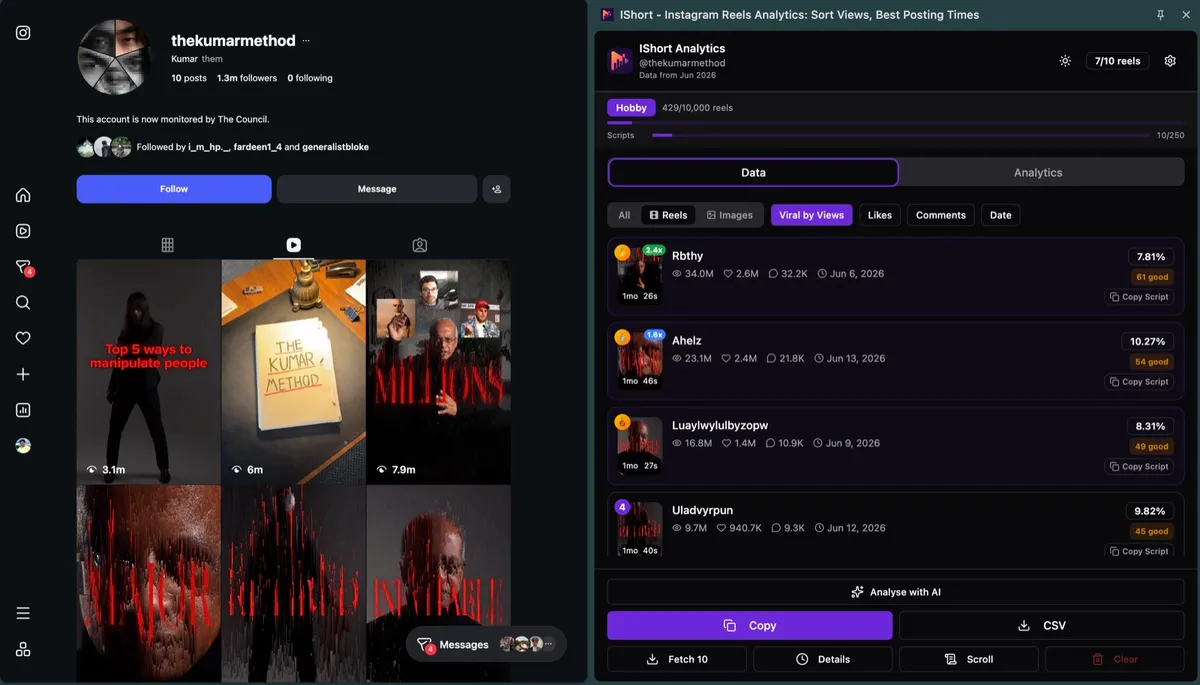
Read the screenshot the way you would read your own results: the top of the list tells you which Reels the algorithm pushed hardest, and the multiple tells you how unusual that was for this account. A 2x Reel on a small account is often a stronger signal than a big number on an account where every Reel gets millions. Cards also show likes, comments, duration and post date, so you can see at a glance whether the winners share a length, a topic or a time.
What Each Sort Button Does
| Button | How it ranks | Use it to |
|---|---|---|
| Views | Raw view count, highest first | Find the Reels that reached the most people |
| Viral | Viral Score 0-100: 35% like ratio + 35% comment ratio + 30% views vs the account average (each capped) | Find Reels that did well for their size, not just the biggest ones |
| Likes | Like count, highest first | Find what the existing audience loved (and rank photo posts, which have no views) |
| Comments | Comment count, highest first | Find topics that start conversations |
| Date | Newest first | Check recent momentum |
A media filter (All / Reels / Images) sits next to the sort buttons. Sorts run one way (highest or newest first); there is no ascending toggle, so to find flops, scroll to the bottom of the Views list.
Honest Limits
- Public counts only. Views, likes and comments are public; reach, watch time and follower demographics are not, so no outside tool can sort by them.
- Some posts hide numbers. Instagram withholds the view count on some posts, and creators can hide like counts; those Reels sort lower or show no figure.
- Only what is loaded gets sorted. IShort ranks the Reels it has collected. Scroll further (or use Scroll) to include older ones.
- Plan limits. The free plan includes a one-time allowance of 500 reels; Hobby ($10/month) covers 10,000 a month and Creator ($29/month) is unlimited.
- Private accounts are only visible if you already follow them.
How IShort's Sorting Works
When you visit any Instagram profile's Reels tab with IShort installed, the extension automatically collects data as you scroll. Here's what you see for each Reel:
Reel Card Display
Each Reel shows: thumbnail preview, caption snippet, views count, likes count, comments count, duration, and relative post date (e.g., "3 days ago").
Engagement Badge
A color-coded engagement percentage badge shows at a glance how well each Reel performed relative to its views.
Top 3 Highlights
The top 3 Reels in the current sort get numbered rank badges, so the leaders stand out.
Outlier Score
Badges such as 1.6x, 2.4x or 0.4x show a Reel's views vs the account's average views. Badges appear from 1.5x up (and below 0.5x for flops); a 3x badge means three times the average.
Viral Score (every plan)
A 0-100 score for each Reel: 35% like ratio, 35% comment ratio and 30% views vs the account average. 70+ is labelled viral, 40-69 good.
Detailed Insights
Click any Reel to open an insights view with its performance score, its views, likes and engagement vs the account average, and short auto-generated notes (for example "This reel got 6.4x more views than your average").
What to Do With Your Sorted List
- Study the top 10, not the top 1. One Reel can be luck; a pattern across the top 10 is a signal. For a checklist of what to copy, see how to find the top-performing Reels of any account.
- Check the multiple, not just the count. A 3x badge on a small account says more than a big number that is normal for a big one. The outlier score explains the maths.
- Scroll to the bottom for flops. The last Reels in the Views list show which topics and hooks to drop.
- Go wider than one account. To spot breakout Reels across a niche, run the Instagram viral Reels finder method on 5-10 accounts.
- Keep the winners. Save the top Reels for reference with IShort's Download all media button.
For a deeper read of one account (posting times, hashtags, audio), see the Instagram profile analyzer guide.
IShort vs. Manual Sorting: Side-by-Side Comparison
| Task | Manual Method | With IShort |
|---|---|---|
| Find your top 10 Reels by views | Click through 50+ Reels one by one, write down view counts, compare manually | Sort by views in 1 click |
| Identify outlier viral content | Calculate average views, manually compare each Reel | Outlier Score badges show 2x, 3x, 5x performers automatically |
| Analyze competitor's best content | Not possible without visiting each Reel individually | Sort any public profile by views or Viral Score |
| Track engagement rate trends | Manual spreadsheet tracking, time-consuming | Engagement % badge on every Reel |
| Export data for reporting | Copy/paste each Reel's stats manually | One-click CSV or copy to Google Sheets (11-14 columns per Reel) |
For an account with a hundred Reels, the manual method means opening and noting every one; with IShort it is a scroll and a click.
Start Sorting Your Reels Today
Install IShort for free and find your best performing content in seconds. No credit card required. Works on any public Instagram profile.
Install IShort FreeGoing Beyond Views
Every plan, including Free, has all five sorts and the analytics slides. Paid plans only raise how many Reels you can collect.
Viral Score (0-100)
The Viral Score weighs three things, each capped so one freak number can't dominate:
- Like ratio (likes / views), 35% of the score, capped at 8%
- Comment ratio (comments / views), 35%, capped at 1%
- Views vs the account's average, 30%, capped at 3x
Because it is relative to the account, a Reel with 10K views and a Viral Score of 80 can have out-performed one with 50K views and a score of 45 on the same account.
Multi-Metric Sorting
There is no multi-metric sort, but Viral Score blends likes, comments and views against the account average in one number. Sorting by it surfaces Reels that are both viral and highly engaging—the perfect combination.
Slides for the questions sorting can't answer
The only filter is media type (All / Reels / Images). For "which length works" or "does original audio win", swipe to the analytics slides instead: Duration and audio, the posting-time heatmap, and Hashtags. Or export to Google Sheets and filter there; see export Instagram Reels data to Google Sheets.
Frequently Asked Questions
Can you sort Instagram Reels by most viewed?
Sometimes, in the app. Since late 2025 Instagram has been rolling out a Most viewed option on profile Reels tabs, but not every account has it and some users report it disappearing in 2026. instagram.com has no sort. IShort sorts any public account's Reels by views on desktop, with each Reel's multiple of the account's average.
How do I see the most viewed Reels on someone's profile?
Install the free IShort extension, open instagram.com/username/reels/ in Chrome or Edge, let IShort collect the Reels, then click Views in the side panel. The most viewed Reel is at the top. It works on any public profile, and on private ones you already follow.
Can I sort my own Reels by views in Instagram Insights?
Yes, within the insights time range (up to 90 days for free). Open Professional dashboard, or Your dashboard on a public personal account, go to Content you shared, filter to Reels and sort by views. Insights never sorts anyone else's Reels.
Is IShort free to use?
Yes. The Free plan includes every sort (views, Viral Score, likes, comments, date), the analytics slides and CSV export for a one-time allowance of 500 Reels. Hobby ($10/month) and Creator ($29/month) raise the Reel and transcript limits.
What's the difference between sorting by views and by Viral Score?
Views shows the Reels seen the most. Viral Score weights likes and comments per view and compares views with the account's average, so it surfaces Reels that did well for their size even if they weren't the biggest.
Sources
- PiunikaWeb: Instagram Reels sorting by most viewed (Nov 24, 2025)
- Social Media Today: Instagram tests Latest and Most Viewed filters for the Reels feed (Apr 2025)
- Meta Help Center: View account and content insights on Instagram (checked Oct 2026)
Install IShort and Sort Your Reels Now
Join 8,000+ Chrome users who use IShort to find their best content and grow faster. Free forever. No credit card required.
Get Started Free