

Quick answer: Instagram Insights doesn't show views per hashtag; at most it counts hashtags as one combined source. To see which tags work, compare the average views of the Reels that used each tag. IShort does that free for any public account: open its Reels page on instagram.com, open IShort's analytics and check the Hashtags slide.
What Does Instagram Insights Show About Hashtags?
Very little. Insights can tell you where a post's audience came from, but hashtags are lumped together as one source, so no single tag gets credit (Sprout Social). Here is what each tool can answer.
| You want to know | Instagram Insights | IShort |
|---|---|---|
| Views per hashtag | No | Yes: average views of the Reels that used the tag |
| Engagement per hashtag | No | Yes: average (likes + comments) / views |
| How often each tag was used | No | Yes: usage count |
| Tags on someone else's Reels | No | Yes, on any public account |
| Reach or impressions per tag | No, combined at most | No: Instagram doesn't publish it for any account |
| Every tag per Reel in a spreadsheet | No | Yes: Hashtags column in the CSV export |
Account Hashtags vs a Hashtag Across Instagram
"Hashtag analytics" covers two different questions. Know which one you're asking before you pick a tool.
| Question | Example | Where to look |
|---|---|---|
| Which tags work on one account? | Do my #mealprep Reels beat my #recipes Reels? | IShort's Hashtags slide on that account's Reels page |
| How is one tag doing across Instagram? | Who posts with #ourbrandchallenge, and what's on top? | The tag's page in Instagram search for top and recent posts; social listening tools for campaign volume and sentiment |
This page covers the first question, which is the one that changes what you put in your next caption.
How to Check Hashtag Performance on Any Instagram Account
- Install IShort from the Chrome Web Store (it also runs on Edge) and sign in with Google. It never asks for your Instagram password.
- Open a Reels page on instagram.com, yours or a competitor's: instagram.com/username/reels/.
- Let IShort collect the Reels. Scroll, or use the side panel's collect button. The more Reels it reads, the more reliable each tag's average.
- Open the analytics dashboard and swipe to the Hashtags slide.
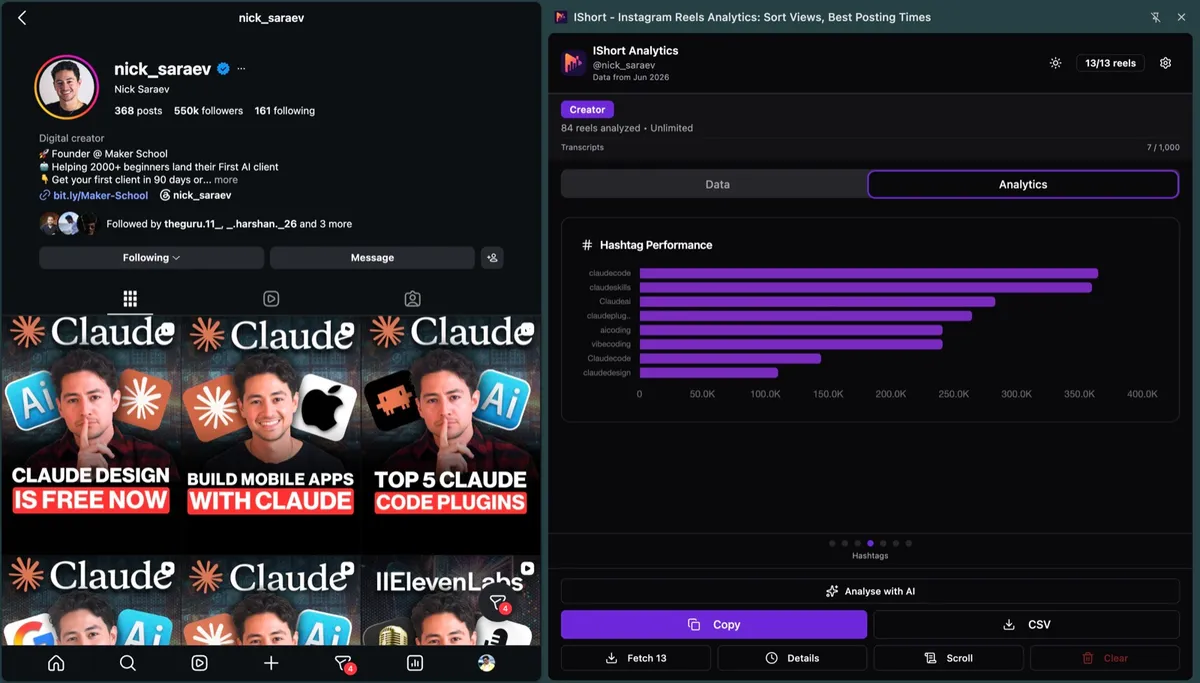
Each bar shows three numbers:
| Metric | What it shows |
|---|---|
| Average views | Mean views of all Reels that used this hashtag |
| Engagement % | Mean (likes + comments) / views for those Reels |
| Usage count | How many of the loaded Reels used the tag |
- Tags used only once are hidden. One viral Reel would otherwise crown a random tag.
- Every Reel card shows up to 5 tag badges, and the Reel's insights view lists all of its tags.
- The CSV export has a Hashtags column, so you can pivot every tag in Google Sheets.
How to read the chart:
- High views, high usage: a proven tag. Keep it.
- High views, low usage: could be one lucky Reel. Use it 2-3 more times before you trust it.
- Low views, high usage: it's taking a slot without helping. Replace it.
Do Hashtags Still Affect Views? What 1,227 Reels Show
We checked hashtag counts on 1,227 Reels that IShort users transcribed between July and September 2026 (1,048 had a view count). 53% carried at least one hashtag; among those, the median was 5 tags.
| Hashtags on the Reel | Reels | Median views | vs the creator's own median |
|---|---|---|---|
| None | 441 | 152,121 | 0.99x (127 Reels) |
| 1-2 | 56 | 291,546 | Too few to compare |
| 3-5 | 435 | 220,582 | 1.00x (132 Reels) |
| 6 or more | 116 | 640,173 | 1.08x (76 Reels); mostly older Reels posted before the 5-tag cap |
Raw medians favour tagged Reels, but that mostly reflects which creators use tags. Measured against each creator's own median (36 accounts with 5+ Reels in the sample), Reels with no hashtags and Reels with 3-5 hashtags landed at the same level. That matches Instagram's line that hashtags help search, not reach.
Caveat: users chose which Reels to transcribe, so the sample skews toward Reels that already did well. Numbers are aggregates; no creator is named.
How Many Hashtags Should You Use on Reels in 2026?
- Five at most. Instagram began capping posts and Reels at 5 hashtags in December 2025, saying fewer, targeted tags work better than generic ones (Social Media Today).
- They label, they don't boost. Mosseri says hashtags help search but "don't increase your reach" (The Verge).
- Nobody follows hashtags any more. Instagram removed hashtag following in December 2024 (Content Marketing Institute).
So pick 3-5 tags that describe the video, and put the same keywords in your caption. Need a starting set? Copy a 5-tag pack for your niche, then write the caption with our Reels caption templates.
How to Use Your Hashtag Data (5 Steps)
- Keep your top 3. Take the 3 tags with the highest average views, but only trust tags used on 3+ Reels.
- Break ties with engagement. If #fitness and #homeworkouts get similar views but #homeworkouts has the higher engagement %, keep #homeworkouts.
- Drop the bottom of the chart and generic tags such as #reels, #explore or #viral that never sat on your best Reels.
- Test one new tag at a time. Keep 4 tags fixed and swap the 5th for 5-10 Reels, or try it on a trial Reel A/B test first.
- Benchmark 3 competitors. Run the Hashtags slide on their Reels pages and borrow tags that sit on their outliers. For a full check of an account, run a free Instagram audit.
A simple way to fill your 5 slots:
| Bucket | Definition | Slots per Reel |
|---|---|---|
| Proven | Your top tags by average views, used 3+ times | 2-3 |
| Solid | Used 2+ times with above-average engagement | 1 |
| Test | A new tag you're trying | 1 |
Pro tip: Export your data monthly. A tag that worked in January can fade by March; the CSV lets you compare months side by side.
Frequently Asked Questions
Does Instagram Insights show hashtag performance?
Not per hashtag. At most, a post's insights count hashtags as one combined source, so you can't tell which tag did the work. To compare tags, look at the average views of the Reels that carried each one, which is what IShort's Hashtags slide does.
How many hashtags can you use on Instagram Reels in 2026?
Five. Instagram began capping posts and Reels at 5 hashtags in December 2025 and rolled the limit out gradually. Instagram says a few targeted tags work better than a long list of generic ones.
Do hashtags still increase reach on Instagram?
Not on their own. Adam Mosseri has said hashtags help people find posts in search but don't increase reach. In IShort's sample of 1,227 Reels, Reels with 3-5 hashtags and Reels with none did the same against each creator's own median.
Can I see which hashtags a competitor's Reels use and how they performed?
Yes, for any public account. Open the account's Reels page on instagram.com with IShort, load the Reels and open the Hashtags slide. It ranks the tags used at least twice by the average views of the Reels that carried them, and the CSV export lists every tag per Reel.
Is IShort's hashtag analytics free?
Yes. Hashtag analytics is part of the dashboard on every plan, including Free, which covers a one-time allowance of 500 Reels. Hobby ($10/month) and Creator ($29/month) raise the limit.
Sources
- Social Media Today: Instagram implements new limits on hashtag use (Dec 2025)
- The Verge: Instagram wants to limit hashtag spam (Dec 2025)
- Content Marketing Institute: Instagram's hashtag move (Dec 2024)
- Sprout Social: Hashtag analytics (native Insights has no per-tag data)
- IShort data: 1,227 Reels transcribed by IShort users, Jul-Sep 2026 (aggregate only).
Stop Guessing. Start Tracking.
See which tags sat on your best Reels, and on your competitors', in one slide. Free plan included.
Get IShort Free