

Quick Answer: To get an Instagram video transcript, install the free IShort extension, open a Reel (or an account's Reels list) and click Transcribe. IShort sends the audio to its transcription server and returns a timestamped script in seconds, copied to your clipboard. It handles English in any accent, from US and UK to Australian. Works on Reels up to 2 minutes; 10 transcripts free (one-time), no Instagram login.
Watching a Reel is quick. Getting its words out as text used to mean pausing every few seconds and typing by hand. An Instagram video transcript generator fixes that. It turns the spoken audio of a Reel into a script you can copy. Use it to study a competitor's hooks, repurpose a script for TikTok or Shorts, write captions, or build a swipe file of openers that work. Say a fitness coach saves the first lines of 20 Reels that each passed 100K views. That's a ready-made hook library. This guide shows how to make a transcript in seconds with IShort, and where it helps most.
Why Instagram Can't Give You a Transcript
Instagram's auto-generated captions appear on screen while a Reel plays, but there's no button to see or copy them as text, they only exist if the creator left captions on, and they can't be exported. The only official text is the caption the creator typed, which rarely matches what's said. To get the spoken words you need to transcribe the audio yourself.
What You Get in Each Transcript
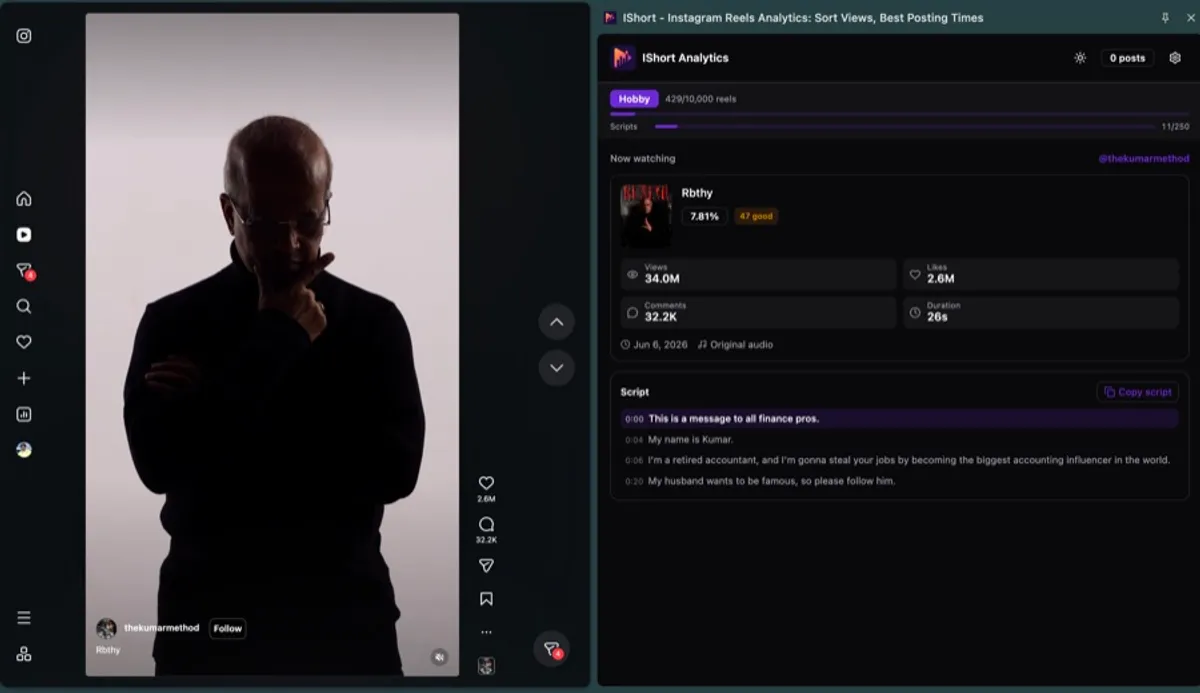
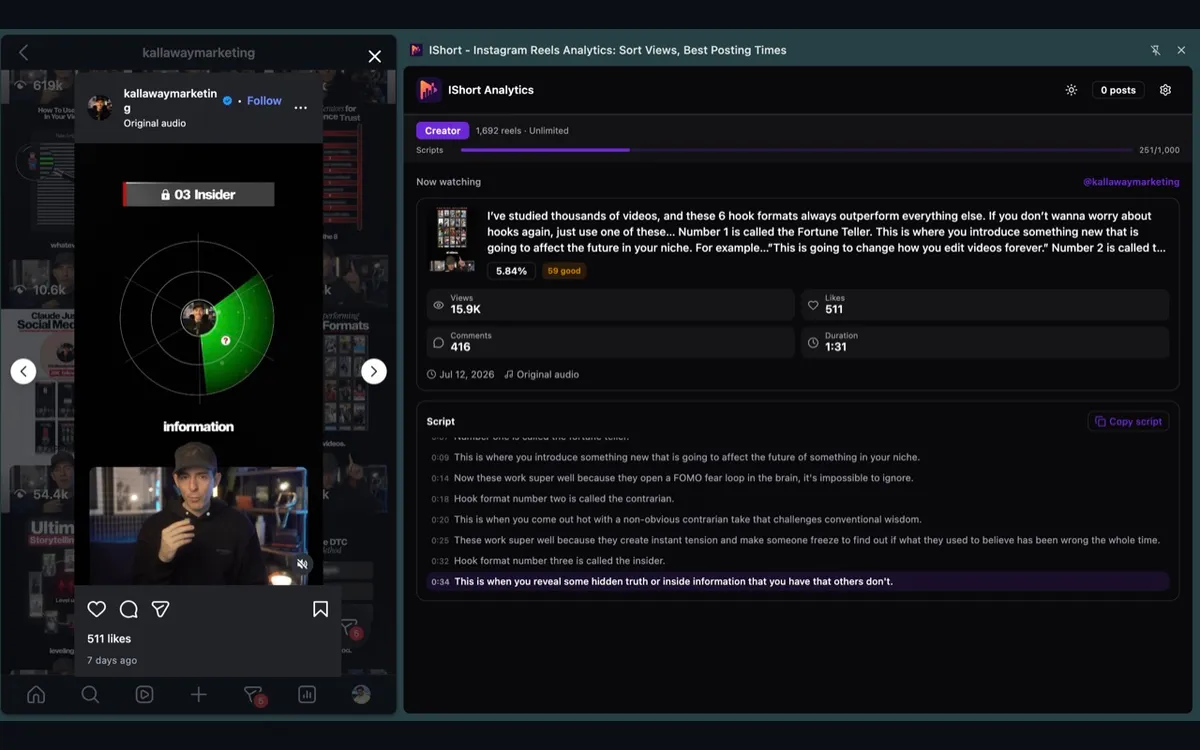
- Timestamped lines (0:09, 0:14...) you can paste into a doc or use to find a moment in the video.
- Follow-along highlight: the current line lights up as the Reel plays.
- Copy script (with timestamps) and Copy for AI rewrite, which wraps the script in a prompt so ChatGPT or Claude can rewrite it for your niche.
- The stats beside it: views, likes, comments, duration and engagement, so you know whether the script is worth copying.
- A saved library: every transcript is kept in the Scripts tab of your ishort.pro dashboard, searchable by account.
Honest Limits
- 2-minute cap. Reels longer than 2 minutes can't be transcribed yet.
- Server-side. The audio is sent to IShort's transcription service; it isn't processed on your computer. You sign in to the extension with Google, but never give IShort your Instagram password.
- Speech, not song. Music-only Reels and lyrics over loud backing tracks come out poorly or empty.
- Languages. English in any accent, detected automatically. A few more languages are listed in the FAQ below. Spanish, French, German and most other languages aren't supported yet.
- Allowance. Free: 10 transcripts in total. Hobby ($10/month): 250 per billing month. Creator ($29/month): 1,000. A Reel someone has already transcribed may come back instantly from the shared cache.
- Posts you can view. Private accounts you don't follow can't be transcribed.
What Is an Instagram Video Transcript?
An Instagram video transcript is the full written text of everything spoken in a Reel or video. It differs from on-screen captions (the text overlays a creator adds) and from Instagram's own auto-captions — a transcript captures the complete spoken script, start to finish, as one block of editable text you can copy, edit, and reuse anywhere.
People search for a transcript instagram video tool for all kinds of reasons: repurposing a Reel into a blog post or newsletter, adding accessible subtitles, or simply reading a video faster than watching it. Whatever the reason, the goal is the same — turn audio into text without manual typing.
How to Get a Transcript of an Instagram Video
With IShort, converting an Instagram video to transcript is a one-click job. There is no separate download step. Here is the full flow:
- Install IShort — add the free Chrome extension from the Chrome Web Store.
- Open a public Reel — go to any public creator's Reel or their Reels page on instagram.com.
- Click Transcribe — in the IShort panel, hit Transcribe on the reel you want.
- Copy your transcript — the text appears in seconds, ready to copy into your notes, doc, or editor.
Because the transcription runs on IShort's servers, your computer is not doing the heavy lifting — you get a fast, consistent result whether you are on a laptop or a lightweight machine. And since IShort works on any public account, you can transcribe your own Reels or a competitor's.
Get Your First Transcript Free
Install IShort, open any public Reel, and click Transcribe. Server-side, one click, auto language detection — your first 10 transcriptions are on the free plan.
Install IShort FreeBuilt for English, in Any Accent
Most Reels you'll want to study are in English. IShort transcribes spoken English whether the speaker is from the US, the UK, Canada, Australia or anywhere else. You don't have to set the language. IShort auto-detects the spoken language and returns the text in it.
This page is an overview of the transcript generator. For the full list of supported languages and accuracy notes, see our guide on transcribing Reels in 11 languages.
Top Uses for an Instagram Video Transcript
Once you can pull the words out of any Reel, a lot opens up:
Repurpose content
Turn a Reel's script into a blog post, newsletter, or on-screen captions — then repurpose it to TikTok and Shorts without retyping.
Accessibility & subtitles
Use the transcript as a base for accurate subtitles so deaf and hard-of-hearing viewers, and sound-off scrollers, can follow along.
Study winning hooks
Read the exact opening lines of Reels that took off and reverse-engineer the script structure that keeps people watching.
Competitor research
Transcribe rivals' top Reels to see what they actually say, then analyze competitor Reels at scale.
Free vs Paid: Transcription Limits
IShort's transcription is instagram video transcript free to start, with paid tiers when you need volume. Every plan uses the same one-click, server-side transcription and auto language detection.
| Plan | Price | Transcriptions | Reels analyzed |
|---|---|---|---|
| Free | $0 | 10 (one-time) | 500 (one-time) |
| Hobby | $10/mo | 250 / billing month | 10,000 / billing month |
| Creator | $29/mo | 1,000 / billing month | Unlimited |
For most creators the free plan is enough to test the workflow on a handful of Reels. Heavy repurposing or agency-scale competitor research is where the Hobby and Creator tiers pay off.
IShort vs Other Instagram Transcript Tools (2026)
Most Instagram transcript generators are single-purpose: you paste a Reel URL and get text back. IShort is different, transcription is built into a full Reels analytics extension, so the same tool that pulls the script also shows you views, engagement, best posting times and competitor data. Here is how the popular free options compare.
| Tool | How it works | Free tier | Beyond transcription |
|---|---|---|---|
| IShort | Chrome extension, one click on any public Reel, server-side, English in any accent (11 languages auto-detected) | 10 free transcriptions (one-time), no Instagram login | Full Reels analytics: sort by views or Viral Score, engagement % per Reel, best posting times, hashtags, any public account |
| TokScript | Paste a Reel/TikTok/Shorts URL on the website, get a transcript | Free plan with limited credits, Pro from ~$39/yr | Transcription and script download only |
| GetTheScript | Paste a URL on the website, get a transcript | Free transcript generator | Transcription only |
| ScreenApp | Upload or link a video, AI transcription and summaries | Free tier with limits | General video transcription and notes, not Instagram-specific analytics |
Key takeaway: if you only ever need to paste one URL and copy the words, a single-purpose tool like TokScript or GetTheScript works fine. If you transcribe Reels as part of studying what actually performs, sorting a creator's Reels by views, checking posting times, then pulling the script behind the winners, IShort does both in one free Chrome extension without an Instagram login.
Frequently Asked Questions
How do I get a transcript of an Instagram video?
Install the free IShort Chrome extension, open any public Reel or a creator's Reels page, and click Transcribe. IShort processes the audio on its servers and returns the full text transcript in seconds — no manual typing required.
Is the Instagram video transcript generator free?
Yes. The free plan includes a one-time allowance of 10 transcriptions plus data on 500 reels. If you need more, the Hobby plan ($10/mo) includes 250 transcriptions and the Creator plan ($29/mo) includes 1,000 per billing month.
What languages does the transcription support?
English is the main language, in any accent: US, UK, Canadian, Australian and more. Also transcribes 10 Indian languages: Hindi, Bengali, Tamil, Telugu, Gujarati, Kannada, Malayalam, Marathi, Odia and Punjabi. The language is detected automatically, so you don't pick it. Spanish, French, German and other languages aren't supported yet.
Do I need to download the Instagram video first?
No. IShort transcribes any public Reel while you browse Instagram. There is no download step. You click Transcribe, the text is generated on IShort's servers, and it shows up in the extension panel.
Can I transcribe someone else's Instagram Reel?
Yes, as long as the account is public. IShort works on any public creator's Reels, which makes it useful for competitor research and studying the hooks and scripts of videos that perform well in your niche.
How does IShort compare to TokScript and GetTheScript?
TokScript and GetTheScript are single-purpose transcript generators: you paste a Reel URL on their website and get the text back. IShort transcribes with one click directly on any public Reel and also gives you full Reels analytics in the same free Chrome extension, sort by views or Viral Score, engagement %, best posting times and hashtags. If you only need raw text from one URL, a single-purpose tool is fine; if you transcribe as part of analyzing what performs, IShort covers both.
Start Transcribing in Seconds
An Instagram reel video transcript is one of the fastest ways to get more out of content you or others have already made — repurpose it, caption it, or learn from it. With IShort you get one-click, server-side instagram video transcription for English in any accent, all from a free Chrome extension.
Install IShort, open a Reel, and click Transcribe — your first transcript is seconds away.